Agentic Development / Context Window
The most common mistake is treating the context window like storage – assuming the more you dump in, the more the agent knows.
It is the exact opposite. As conversation history grows, response quality drops because key facts get diluted – a problem called context rot.
Ten thousand lines of build logs, four dead-end files, and three failed fixes are noise, not information. The model must dig through clutter to find your prompt and can easily miss what matters.
The context window is a workspace, not an archive. That leaves two key questions: what do you put on it on purpose, and what do you clean away?
You pay twice for every piece of information on it – in tokens per request and in model attention. Space is limited, so managing context is an economic decision, not a technical detail.
Where to put instructions
The agent can run a build, but it does not know project conventions. It does not know that sbt is not run from the terminal here, that try/catch is forbidden, or that scalafmt runs after each change. It also does not know you hate three-paragraph intros for yes/no questions. You have to provide these rules yourself.
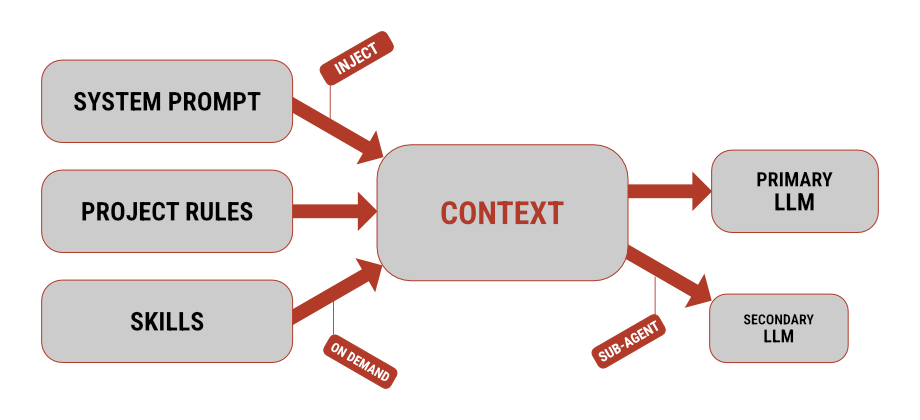
You can give custom instructions to an agent in three places. Each serves a different purpose and enters the context at a different time.
System prompt
The first option is the system prompt – instructions sent to the model with each request by the harness (tool running the agent). It sets how the agent behaves: tone of voice, tool usage, and when to ask questions instead of guessing.
Official CLI tools rarely let you change their system prompt, while agnostic tools make it accessible. You usually have two choices: replace the default prompt completely, or append your own text to it.
Put project-independent rules here. For example, demanding direct answers without introductions, forbidding commits without approval, or treating “wdyt” as discussion rather than an edit command.
Replacing the prompt entirely is usually a bad idea. The default prompt also holds tool instructions, such as exact file edit formats. If you drop them, the agent can fail at basic operations.
Project instructions
The system prompt configures the agent; project instructions describe the repository. The filename depends on the tool: many use AGENTS.md, while Claude Code reads CLAUDE.md (which can redirect via @AGENTS.md).
This file lives at the root of the repository and loads into context at the start of every session. It contains rules that apply to anyone working in the codebase.
## Build

- ALWAYS use Metals MCP tools instead of sbt for compiling and
  running tests: `compile-file` / `compile-module` / `compile-full`
  to compile, `test` to run test suites (Weaver Test, ScalaTest,
  etc.)

## Code style

- Scala 3 brace-less syntax
- Never try/catch - use `Try`, `Either`, etc.
- `Either.cond(condition, right, left)` over `if/then/else`
- Descriptive names, no abbreviations (`fingerprint` not `fp`,
  `fieldSchema` not `fs`)
Notice that every rule is concrete and testable. Vague advice like write readable code wastes tokens because the agent cannot act on it. In contrast, fingerprint not fp gives a rule the agent can strictly follow.
Brevity is critical. The file stays in context throughout the session, so keep edge cases out. A few extra lines do not hurt, but long lists drown out important rules.
Skills
For extensive workflows, use skills. A skill is a markdown file with steps for a specific task and a short description that tells the agent when to use it.
Only the description stays in context permanently. The agent loads the full instructions only when facing that specific task – a pattern called progressive disclosure.
---
name: weaver-test
description: Conventions for writing tests with Weaver Test
 (weaver-cats) in Scala. Use when writing or reviewing
 Weaver test suites, assertions, or `expect` usage.
---

# Weaver Test

Write assertions with `expect.same` and combine them using `List(...).combineAll`...
This lets you move heavy reference guides out of project instructions: Cats Effect patterns, rules for working with Resource, code review checklists, or company processes.
| Where | What belongs there | When it loads |
|---|---|---|
| system prompt | agent behavior, personal preferences | always |
| project instructions | project conventions and commands, team rules | always |
| skill | complete procedure for a specific task | on demand |
Ownership sets the boundary between the system prompt and project instructions. The system prompt is personal and kept outside the repo, while project instructions stay inside the repo for the team.
Frequency determines what belongs in a skill. Put daily tasks into project instructions, and move rare workflows into a skill.
How to clean the workspace
You set instructions once. The rest of the workspace fills up on its own. You can clean it in three ways, depending on the situation.
Compaction (summarizing past messages) condenses older history. It is convenient because it runs automatically, but it is the least precise – whatever gets cut from the summary vanishes from future context.
Branching rewinds the conversation to a point before a wrong step and drops the dead branch. It is fast, cheap, and accurate. It is also great for experiments – try one path, and delete it if it leads nowhere.
A sub-agent delegates a subtask to an isolated instance with its own context, returning only the final result to the main chat. Codebase search is a standard use case where you only want the final answer, not the file inspection trace.
You can also assign a cheaper model to sub-agents for simple jobs. The downside is isolation – without access to main chat history, incomplete prompts will return wrong answers.
I prefer branching when I want to test an idea and rewind cleanly. I use sub-agents for isolated tasks where I only need the result, like running sbt tasks or search. Compaction is my last resort, not a primary strategy.
Conclusion
You can swap the model and the harness, but you always build the context. Response accuracy drops with every piece of clutter that did not need to be on the desk.
Examples of sub-agents and skills I use are available on GitHub.